
Manage offer statuses
Every artwork included in an offer has its own status, so you can keep track of where it stands in the sales process.
Statuses are managed per artwork, not only for the offer as a whole. This lets you follow several artworks within the same proposal, even when each one moves forward differently.
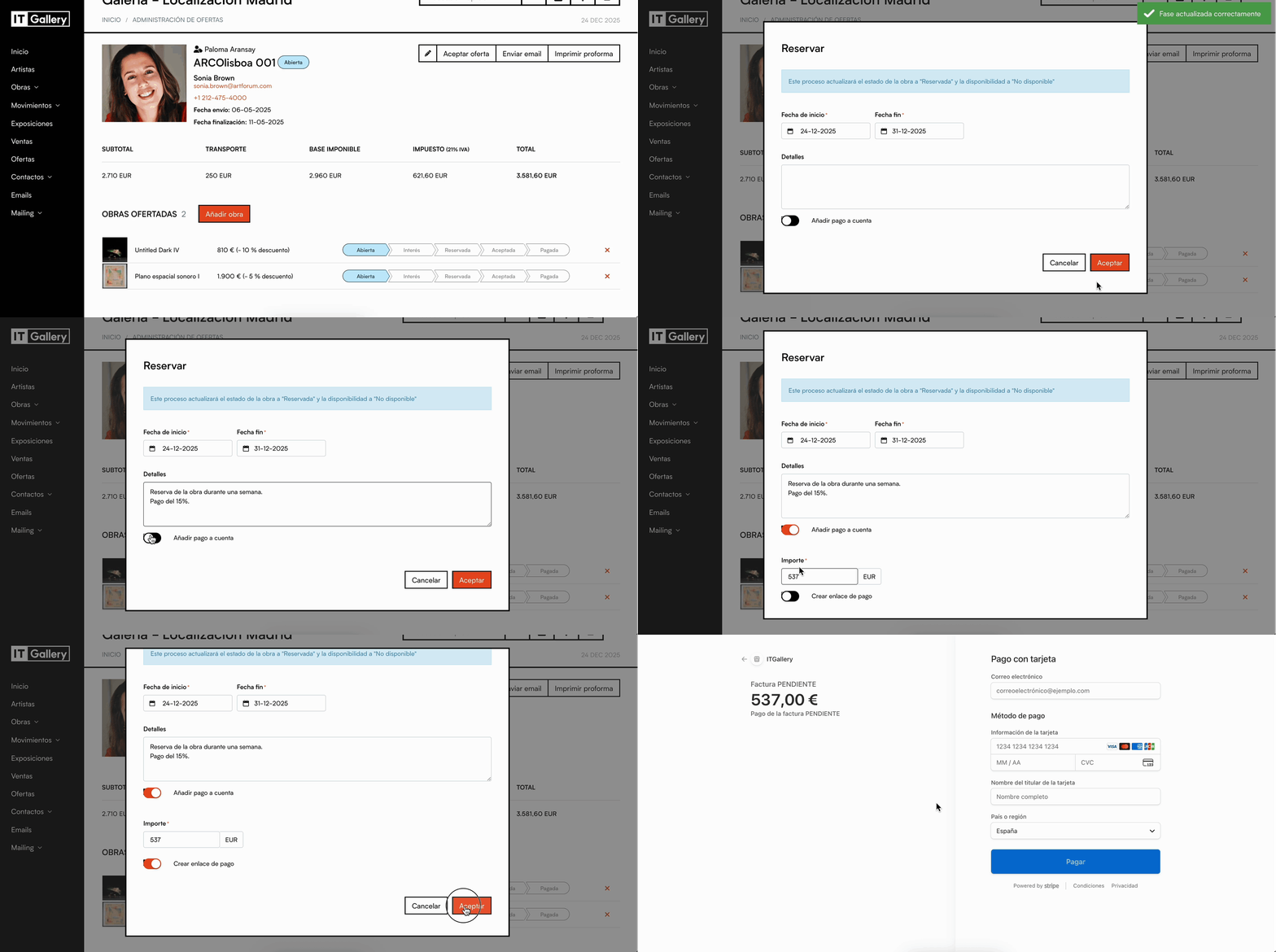
- Go to the Offers module from the side menu.
- Open the offer you want to review.
- Go to the Works offered block.
- Find the artwork whose status you want to change.
- Click the relevant status in the status line of that artwork.
- Fill in the additional fields if the selected status requires them.
- Save or confirm the action.
Tip
If an offer includes several artworks, each artwork can have a different status. For example, one artwork can be Reserved while another stays Open within the same offer.
Available statuses
Open
This is the default status when you create a new offer.
It means the artwork or artworks are included in the proposal, but the contact has not made any move yet.
Interested
Use this status to show that the contact has expressed interest in the artwork, but has not reserved or accepted it yet.
Reserved
Use this status when the contact wants to reserve the artwork.
When you select Reserved, additional options become available to record the reservation:
- Add a start date and an end date for the reservation.
- Record additional details.
- Record a payment on account.
If you record a payment on account, ITGallery automatically generates an invoice in the Sales module.
From that invoice, you can send a payment link through Stripe if you have the integration active.
Accepted
Use this status when the client has accepted the offer.
From the Accepted status, you can:
- Move the offer status of each artwork individually.
- Generate a linked sale.
- Review or change the details of the sale before confirming it.
- You can also accept the offer from the Accept offer button, at the top of the offer details.
Paid
Use this status when the artwork has already been paid for.
From the Paid status, you can:
- Record the sale if it has not been created yet.
- Add the details of the first payment, or of the full payment if the artwork has been paid in full.
Overall status of the offer
Besides the individual status of each artwork, the offer details show an overall status next to the offer reference.
This status sums up the general situation of the offer, while the status line of each artwork lets you manage the individual follow-up of the artworks offered.